%20(1).svg)



- 1 MIN READ -
With Zoola Analytics, you can filter data in your view based on a date range relative to the current system date. This means that you can schedule a report to go out every two weeks and only show, for example, completions for the past two weeks.
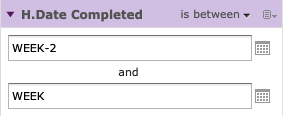
You can accomplish this using date-based filters, the between operator, and entering a text expression describing the relative date or date span you want to display, using the format <KEYWORD> +/- <Number>
The Keyword indicates the time span you want to use; options include DAY, WEEK, QUARTER, SEMI, and YEAR.
The “+” or ”-” symbols indicate whether the time span occurs before or after the chosen date and the number indicates the number of above-mentioned time spans you want to include in the filter.
Here we would see records for courses completed in the past two weeks:
Contact us today. We’d love to help you create a better way to learn!

.svg)
%20(1).svg)